Introducing postmarkd: Sending Mail Should Be One Line
postmarkd runs next to your apps as a systemd service or a container sidecar and delivers mail through Postmark. Cron, shell scripts, SMTP-only apps and Postmark SDKs all hand it mail locally, and it holds the token, fills in defaults, sends in parallel and only retries when it can’t cause duplicate mail. One static Go binary, no dependencies.Every server I’ve run eventually needs to send an email. A cron job wants to say the backup failed. Grafana wants to page someone. A script wants to mail a report. The app itself needs to send password resets. And every one of those things wants to send mail a different way.
Postmark is great at the delivering part. Its API, SMTP and SDKs are all good. The pain is getting everything on a box to talk to it. The server token ends up copied into every app, container and CI secret, so rotating it means touching all of them. Cron and mail expect a local sendmail, which usually means setting up Postfix as an authenticated TLS relay. Shell scripts end up with hand-written curl calls and JSON escaping. And the default From address gets repeated in a dozen config files.
So I wrote postmarkd. It’s a small daemon that runs next to your apps and delivers their mail through Postmark. Apps hand it mail however they like, and postmarkd holds the credentials, fills in defaults, sends in parallel and retries safely.
echo "The nightly backup finished." | postmarkd send -to ops@example.com -subject "Backup OK"That’s the whole goal: sending mail should be one line.
What You Get #
- Four ways in: a Postmark-compatible HTTP API, SMTP,
sendmailand a CLI. - One token in one place. Apps get nothing, or their own client token you can revoke on its own.
- Lots of mail, in parallel. Batches of up to 500 messages, pooled keep-alive connections to Postmark and an optional async queue with back-pressure.
- Retries that can’t duplicate mail. postmarkd only retries when Postmark can’t have accepted the message.
- A black hole for tests. No account, no network, and your tests can read back what was “sent”.
- A DNS checker for DKIM, Return-Path and DMARC, so your mail doesn’t land in spam.
- systemd native: unix socket, socket activation,
Type=notify, watchdog and a hardened unit. - Container ready: a 16 MB non-root image with a health check, plus Compose, Kubernetes and GitHub Actions examples.
- No dependencies. One static Go binary, standard library only.
Every Way an App Sends Mail #
This is the part I care about most. Nothing on the host should have to change how it sends mail. It should just work.
| From | How |
|---|---|
| Shell scripts | postmarkd send -to … -subject …, body from stdin, -attach for files |
cron, mail, PHP mail(), git, logwatch, smartd | Symlink postmarkd as /usr/sbin/sendmail. Nothing else changes. |
| Rails, Django, Laravel, WordPress, Grafana, Gitea… | Point them at localhost:2525. No username, password or TLS. |
| Apps with a Postmark SDK | Change the SDK’s base URL to postmarkd. |
| Any HTTP client | curl --unix-socket /run/postmarkd/postmarkd.sock http://localhost/email -d '{…}' |
All of them end up in the same place: validated, defaulted, rate-limited and sent to Postmark over pooled HTTPS connections.
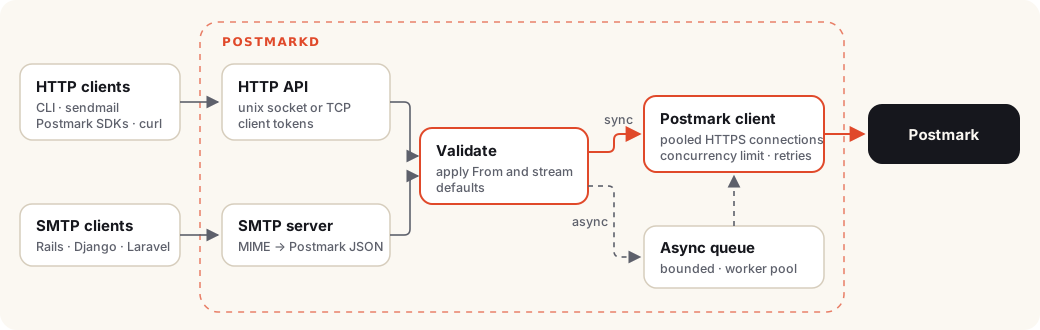
The sendmail one is my favorite. When the binary is called as sendmail, it behaves like sendmail. One symlink and every program that has ever shelled out to /usr/sbin/sendmail now goes through Postmark:
➜ sudo ln -s /usr/bin/postmarkd /usr/sbin/sendmail
➜ printf 'Subject: Disk almost full\n\n/var is at 91%%.\n' | sendmail ops@example.com
No Postfix, no relay config, no TLS certificates.
Quick Start #
Packages for Debian, Ubuntu, Fedora, RHEL and friends are on the releases page, for both amd64 and arm64.
VERSION=0.1.0 ARCH=$(dpkg --print-architecture)
REL=https://github.com/rossedman/postmarkd/releases/download/v$VERSION
curl -fsSLO $REL/postmarkd_${VERSION}_linux_$ARCH.deb
sudo apt install ./postmarkd_${VERSION}_linux_$ARCH.debVERSION=0.1.0 ARCH=$(uname -m | sed 's/x86_64/amd64/; s/aarch64/arm64/')
REL=https://github.com/rossedman/postmarkd/releases/download/v$VERSION
sudo dnf install $REL/postmarkd_${VERSION}_linux_$ARCH.rpmdocker run -d --name postmarkd -p 127.0.0.1:8025:8025 -p 127.0.0.1:2525:2525 \
-e POSTMARKD_SERVER_TOKEN=your-postmark-server-token \
-e POSTMARKD_DEFAULT_FROM=noreply@yourdomain.com \
ghcr.io/rossedman/postmarkd:0.1The packages install the binary, the systemd units, a postmarkd user and a config file at /etc/postmarkd/postmarkd.conf. Add your token, set a sender and start it:
sudo install -m 0600 /dev/stdin /etc/postmarkd/server-token <<< 'your-postmark-server-token'
sudoedit /etc/postmarkd/postmarkd.conf   # set POSTMARKD_DEFAULT_FROM=noreply@yourdomain.com
sudo systemctl enable --now postmarkd
sudo usermod -aG postmarkd "$USER"       # let your user use the socket (log in again)
Now send something. postmarkd send prints the Postmark MessageID:
➜ echo "Hello from $(hostname)" | postmarkd send -to you@example.com -subject "It works"
7cb81923-9c54-413a-8fae-134cc3d9272dTalking to It Over HTTP #
The HTTP API matches Postmark’s, so /email, /email/batch, /email/withTemplate and /email/batchWithTemplates all work, and so do the responses:
➜ curl localhost:8025/email -d '{"To":"ada@example.com","Subject":"Welcome!","TextBody":"Hi Ada"}'
{"To":"ada@example.com","SubmittedAt":"2026-10-13T17:02:48.199788763Z","MessageID":"96f071ce-0674-418f-8a5f-420ebeb0eed5","ErrorCode":0,"Message":"OK"}
I didn’t set a From. postmarkd filled in the default, which is one less thing every app needs to know.
If the caller doesn’t want to wait on a round trip to Postmark, add ?async=true. postmarkd answers 202 right away and sends in the background:
➜ curl 'localhost:8025/email?async=true' -d '{"To":"ada@example.com","Subject":"Async","TextBody":"…"}'
{"ErrorCode":0,"Message":"Queued","Messages":1,"RequestID":"58600d92c66be398188550f2"}Testing Without Sending Anything #
This is the feature I didn’t know I wanted until I had it. Set POSTMARKD_BLACKHOLE=true and postmarkd accepts everything, validates it, applies your defaults, answers exactly like Postmark would, and sends nothing. No account, no token, no network.
docker run -d -p 8025:8025 -p 2525:2525 -e POSTMARKD_BLACKHOLE=true ghcr.io/rossedman/postmarkd:0.1Then your tests can ask what was “sent”. I pointed a CLI send, a sendmail call, two HTTP requests and a Python SMTP client at it, and every one of them came back out the same way:
➜ curl -s localhost:8025/blackhole/messages | jq -r '.Messages[].Message | "\(.From)  \(.To)  \(.Subject)"'
noreply@example.com  ops@example.com  Backup OK
noreply@example.com  ops@example.com  Disk almost full
noreply@example.com  ada@example.com  Welcome!
noreply@example.com  ada@example.com  Async
grafana@example.com  oncall@example.com  [Alerting] CPU high
That makes a test like this possible without mocking a mail library:
def test_signup_sends_welcome_email(app):
    requests.delete("http://localhost:8025/blackhole/messages")
    app.signup("ada@example.com")
    sent = requests.get("http://localhost:8025/blackhole/messages").json()["Messages"]
    assert [m["Message"]["Subject"] for m in sent] == ["Welcome!"]
The startup log, systemctl status and /metrics all say loudly when black hole mode is on, so it’s hard to leave on in production by accident. There’s a GitHub Actions example that runs it as a service container.
Making Sure Your Mail Is Trusted #
Sending mail is the easy part. Getting it into the inbox instead of spam means DKIM, a custom Return-Path so SPF lines up with your domain, and a DMARC record. Gmail and Yahoo require these now for bulk senders. I always forget at least one of them, so postmarkd checks them for you:
➜ postmarkd check-domain yourdomain.com -account-token "$POSTMARK_ACCOUNT_TOKEN"
Email authentication for yourdomain.com

  [PASS] DKIM                         verified by Postmark (20261013pm._domainkey.yourdomain.com)
  [WARN] Return-Path (SPF alignment)  no CNAME pm-bounces.yourdomain.com → pm.mtasv.net
                                      Create CNAME pm-bounces.yourdomain.com pointing to pm.mtasv.net and set it as the Return-Path in Postmark.
  [FAIL] DMARC                        no DMARC record at _dmarc.yourdomain.com. Gmail and Yahoo require one for bulk senders.
                                      Create TXT _dmarc.yourdomain.com with value:
                                      v=DMARC1; p=none; rua=mailto:<reports address>

Some checks failed: mail from this domain may land in spam or be rejected.
Every check that isn’t passing tells you the exact record to create. It exits 1 when something fails, so you can run it in CI and catch someone deleting a DNS record.
Running It Under systemd #
I’ve been writing about running Go services on Linux: reloading on SIGHUP, shutting down cleanly on SIGTERM and running under systemd properly. postmarkd is where all of that ended up. It uses Type=notify to tell systemd when it’s actually ready, keeps the watchdog fed, drains its queue on shutdown, and ships a unit that’s locked down with systemd’s sandboxing options.
It also supports socket activation, including SMTP on port 25 through postmarkd-smtp.socket. systemd opens the privileged port and hands it over, so postmarkd never runs as root.
Or as a Sidecar #
In Kubernetes, postmarkd fits as a native sidecar. It starts before your app, stays up for the life of the pod, and stops after it. Your app talks to it on localhost:8025 or localhost:2525, and nothing is exposed outside the pod:
initContainers:
  - name: postmarkd
    restartPolicy: Always # makes this a sidecar
    image: ghcr.io/rossedman/postmarkd:0.1
    env:
      - name: POSTMARKD_SERVER_TOKEN
        valueFrom:
          secretKeyRef: { name: postmark, key: server-token }
If you’d rather run one shared postmarkd for a namespace, there’s an example for that too, with a client token for each app.
Is It Fast? #
It doesn’t really need to be. A send to Postmark takes 100 ms or more, and postmarkd’s own work takes microseconds. But I still spent more time than I’d like to admit making it faster, and benchmarks run on every CI build. A pull request fails if it adds allocations or makes a benchmark more than 25% slower.
In practice, throughput is set by Postmark’s latency and your account’s limits, not by postmarkd. The benchmarks page has the full table and how to run them yourself.
When Not to Use It #
postmarkd is one more thing to run, even if it’s a small one. It’s not the right fit for:
- One app that already uses a Postmark SDK. Just call Postmark.
- Serverless. There’s nowhere to run a daemon next to a Lambda.
- Mail that has to survive a long Postmark outage, at least until the disk-backed spool lands.
- Remote SMTP clients. Its SMTP server has no TLS, so it’s for localhost, unix sockets and private networks.
Try It #
The documentation site covers everything: getting started, every CLI flag, the HTTP API and how a message moves through the daemon. The fastest way to kick the tires is the black hole, since it doesn’t need a Postmark account:
docker run --rm -p 8025:8025 -e POSTMARKD_BLACKHOLE=true ghcr.io/rossedman/postmarkd:0.1This is the first release, v0.1.0, and it’s MIT licensed. If you try it and something on your box can’t get mail to it, or you have an idea for what it should do next, open an issue on GitHub. I’d love to hear about it.
postmarkd is not affiliated with or endorsed by Postmark or ActiveCampaign.