
limabean

Disposable Linux dev VMs for macOS,
ready for SSH and Claude.

$ brew install rossedman/tap/limabean
~ zsh
$ limabean up dev
✓ Created dev from scratch
✓ Packages up to date
✓ Installed 2 secret(s)
✓ Added to Claude Desktop
$ ssh lima-dev
dev:~/code ❯ docker compose up
  • ~1 minfrom command to shell
  • 30+pinned CLI tools
  • 0SSH keys copied in
  • 100%plain Lima underneath

Project file

One file in the repo.
The same VM for everyone.

Commit a .limabean.yaml and limabean up builds the VM it describes: packs, size, ports, variables, which secrets it gets, its network, a setup script and a start command. Run it again after editing the file and it applies what changed, like docker compose.

$ limabean init --project    # a file from the repo
$ limabean up                # create or update
$ limabean ps                # what's running
$ limabean remote            # fetch its work to your Mac
$ limabean down              # stop; nothing lost
  • Clones the repo into the VM and runs its setup
  • Shows every change and asks before applying it
  • A file can tighten a VM's network, never widen it
.limabean.yaml
packs: [node, claude]
ports: [3000]
vars:
NODE_ENV: development
secrets: [OPENAI_API_KEY] # names; values stay on your Mac
network:
allow: [github, npm]
locked: true
setup: npm ci # once, in the clone
start: npm run dev # after every up
~/src/myapp
❯ limabean up
myapp (from ~/src/myapp/.limabean.yaml)
packs: core, node, claude
network: only github, npm, locked
vars:
NODE_ENV=development
secrets: shared ones, plus OPENAI_API_KEY
clone: github.com/acme/myapp
start, run in the background after every up:
npm run dev
setup, run in the VM:
npm ci
Create myapp? Yes
✓ myapp is ready · http://localhost:3000

Claude drives it

Let Claude drive
its own VMs.

limabean is an MCP server too. From Claude Code or Claude Desktop, Claude creates VMs, clones repositories, runs builds and tests, and snapshots VMs before risky changes. Nothing it runs touches your Mac.

$ claude mcp add --scope user limabean -- limabean mcp
  • Commands run inside VMs, never on your Mac
  • Claude never sees secret values
  • Locked sandboxes it can't widen
Make a locked VM that can only reach GitHub and PyPI, clone acme/scraper and get its tests passing.
create_vm name: "scraper", allow: ["github", "python"], locked: true
✓ Created scraper · Network: 6 domain(s), locked
clone_repo name: "scraper", repo: "acme/scraper"
snapshot_save name: "scraper", snapshot: "fresh"
run_in_vm cd ~/code/github.com/acme/scraper && uv run pytest
exit code 0 · 48 passed
The tests pass in a sandbox that can only reach GitHub and PyPI. I saved a snapshot called fresh before running anything.

Why limabean

A fresh Linux box whenever you want one.
Nothing to lose when you throw it away.

One command per VM

limabean up dev gives you an Ubuntu 26.04 VM with your git identity. It's a copy of a ready-made image, so it only has to boot. limabean up builds the one a repo's .limabean.yaml describes, and limabean recipes starts that file for you.
Only what you need

Every VM has Docker, Python and the core CLI tools. Go, Node, Kubernetes, Terraform, Rust, Java, Ruby and more are packs you pick per VM or per project, every version pinned.

Keys stay on your Mac

Pushes go through your forwarded ssh-agent. A scoped GitHub token lives in your Keychain, and git and AWS config are mounted read-only.

Secrets without files

API keys come from your Keychain, 1Password, environment variables or commands. You pick which ones a VM gets when you create it.

Built for Claude and your editor

Claude manages VMs through MCP, each running VM is an SSH connection in Claude Desktop, and limabean code opens one in VS Code, Cursor or another editor. Claude Code in a VM runs with the plugins your project names, away from your Mac's files.

Safe to throw away

~/code lives on its own disk, so rebuild keeps your repositories, and rm refuses to run while you have unpushed work. Clones take seconds, and --ttl VMs delete themselves.

Quick start

Zero to a shell
in four commands.

limabean is a single binary with its VM templates built in. All it needs is macOS and Lima 2.0 or newer, and Homebrew installs Lima along with it. Prefer not to use Homebrew? Binaries for Apple Silicon and Intel are on the releases page.

Full getting-started guide
  1. Install limabean and Lima

    $ brew install rossedman/tap/limabean
  2. Set up once

    Saves your settings, fixes ~/.ssh/config and checks everything with doctor.

    $ limabean init
  3. Optional: give VMs GitHub access

    $ gh auth token --hostname github.com | limabean github login --with-token
  4. Create a VM and jump in

    $ limabean up dev
    $ limabean ssh dev   # or: ssh lima-dev

    In a repository with a .limabean.yaml, plain limabean up builds its VM.

  5. Hand it to Claude

    Every VM is already an SSH connection in Claude Desktop. Add MCP and Claude can make VMs itself.

    $ claude mcp add --scope user limabean -- limabean mcp

How it works

Layered Lima templates.
No magic.

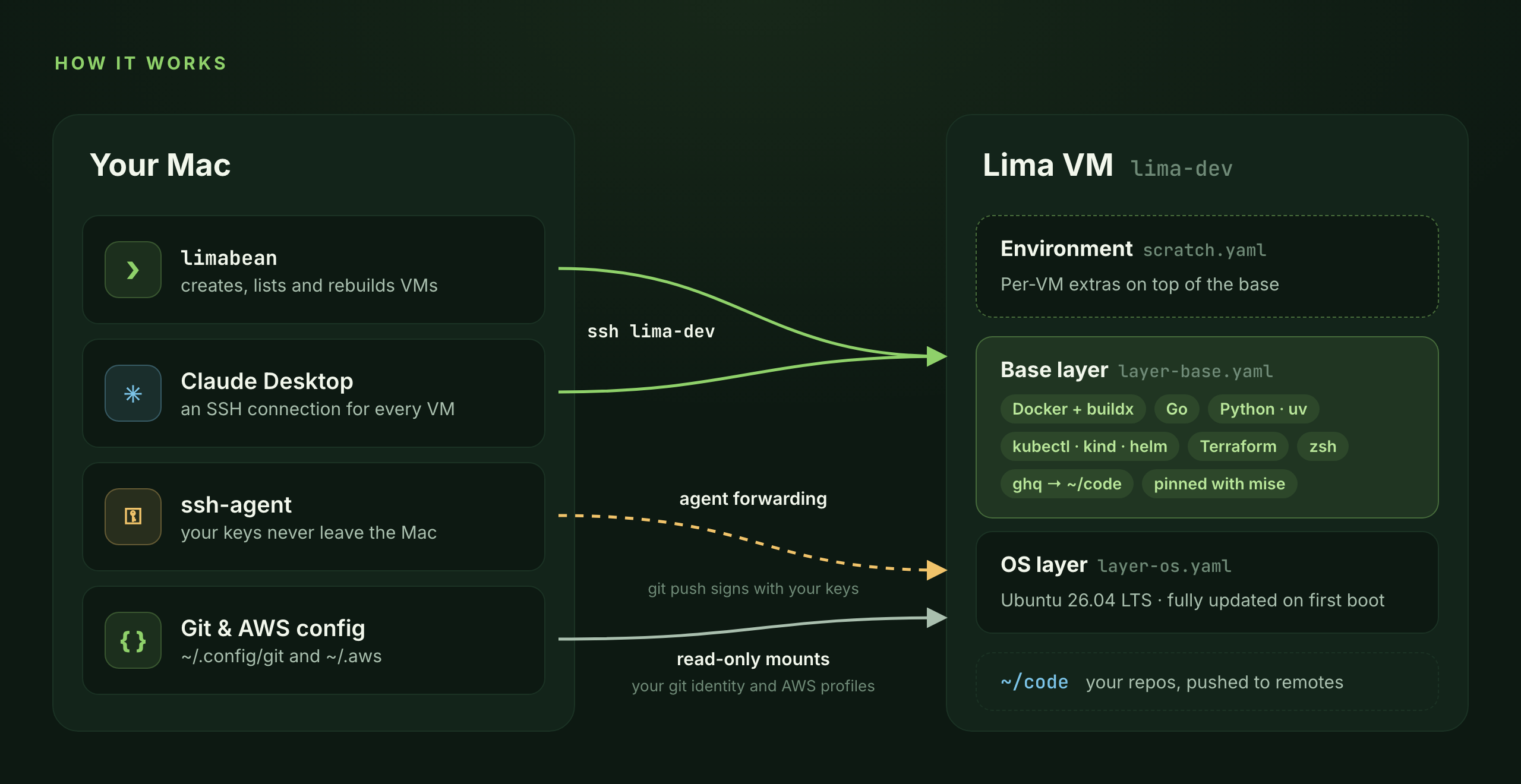
Every VM is built from ordinary Lima YAML and shell scripts, composed in layers. limactl always works, and you can add your own environments without rebuilding limabean.

Your Mac connects to the Lima VM over ssh lima-dev, forwards its ssh-agent and mounts the git config read-only. The VM is built from an OS layer, a base layer and an environment.
layer-os

Ubuntu 26.04 LTS on Apple's Virtualization framework, VM size, agent forwarding, zsh as the login shell.

layer-base

What every VM gets: Docker Engine, mise-pinned tools, shell setup and the read-only git config mount.

environment

scratch out of the box, or your own in ~/.config/limabean/templates/.

Commands

A small CLI that
stays out of the way.

Leave out a VM name and you pick one from a list. Every command has --help with examples.

VMs

up / down
Create or start a VM, or a repo's from its .limabean.yaml; stop it
ps
The project's VM, its start, ports and pending changes
logs
Provisioning, setup and start output, or follow it
recipes
Starter .limabean.yaml files for common VMs
run --rm
One command in a fresh VM, then gone
ls
List VMs, or print JSON with --json
ssh
Open a shell, starting the VM if needed
get
Clone a repository into the VM with ghq
cp
Copy files between your Mac and a VM
code
Open the VM or a repo in VS Code, Cursor or another editor
ports / open
See forwarded ports, open one in the browser
rebuild
Recreate from the current templates, keeping ~/code
clone
Copy a VM, ~/code and all, in seconds
rm
Delete a VM
snapshot save / restore
Checkpoint a VM and roll back to it
images
The ready-made images new VMs are copied from
autostop on
Stop VMs nobody has used for a while

Secrets

secrets ls
List secrets and where values come from
secrets set
Keychain, 1Password, env var or command
secrets rm
Remove a secret
secrets edit
Edit a secrets file in your editor
secrets sync
Install secrets in running VMs
network allow / lock
Limit what a VM can reach, and keep it that way
network learn / log
Record what it needs, see what was blocked

Access & setup

init
Git config, code directory, SSH, GitHub; --project writes a repo's file
config
Every setting, and where it comes from
doctor
Check everything VMs depend on
packs
Languages and tools a VM can get
bump
Update every pinned tool version
github login
Save a scoped token for gh and the API
github status
Account, expiry and which VMs have it
claude sync
Register running VMs in Claude Desktop
mcp
Let Claude create, run and snapshot VMs itself

Full CLI reference

Plant a fresh VM.

Free and open source under the MIT license.