
gh fleet

One change, every repo,
tracked to merged.

A GitHub CLI extension that applies one change across your organization and follows every pull request to the end. Run it again and it updates, never duplicates.

$ gh extension install rossedman/gh-fleet
pin-actions
$ gh fleet targets -f fleet.yaml
REPO MATCHED BY
acme/api file:.github/workflows
acme/billing file:.github/workflows
5 repos (1 skipped)
$ gh fleet apply -f fleet.yaml --yes
pr open acme/api https://github.com/acme/api/pull/1 created
noop acme/worker
4 pr open · 1 noop · 1 skipped
$ gh fleet status -f fleet.yaml
3 pr open · 1 merged · 1 noop · 1 skipped
API quota: core 4,871/5,000 · graphql 4,962/5,000
  • 10commands, from init to close
  • 50repos per batched GraphQL query
  • 1/sdefault writes per second
  • 13tested example campaigns

The problem

The script is easy.
Landing it is the work.

Pinning an action, bumping a Go version or adding a config file takes minutes in one repo. Across an organization it means cloning, branching, pushing, opening PRs, and then watching which ones fail checks, wait for review or never merge. gh fleet runs that loop for you and keeps the ledger.

  • Re-running apply updates open PRs instead of duplicating them
  • One repo failing never stops the others, and retry picks up only those
  • GitHub is the source of truth, so status works with no local state
acme/gatewaypr open PR #1

ci: pin GitHub Actions to commit SHAs

branch fleet/pin-actions
failure · review requiredgh fleet status: the one repo that needs a human
- - uses: actions/checkout@v4 + - uses: actions/checkout@08eba0b… # v4
Core concepts

Describe it once.
Preview, apply, follow.

A campaign is one YAML file: which repos, what to run in each, how to open the PR. Everything else is three verbs.

Campaign

A file you commit and review

Targets, a few lines of Starlark and a PR template. The name derives the branch and the hidden PR marker.

name: bump-go-1-27
targets:
  orgs: [acme]
  include:
    files: [go.mod]
change:
  steps:
    - starlark: ./change.star
pr:
  title: "build: go 1.27"
# change.star
load("@fleet//gomod.star", "set_go_version")
load("@fleet//gha.star", "set_input")

def change(repo):
    set_go_version(repo, "1.27.3")
    set_input(repo, "go-version", "1.27.3")

Plan

Before anything is pushed

Runs the script in a fresh clone of each repo and prints the diff it would send. Repos with no diff are noops.

$ gh fleet plan --repo acme/api
── acme/api
-  - uses: actions/checkout@v4
+  - uses: actions/checkout@08eb… # v4

1 changed · 1 skipped

Track

Until the last PR merges

Status reads every PR back from GitHub: state, checks and review decision, one batched query per 50 repos.

$ gh fleet status
3 pr open · 1 merged
1 noop · 1 skipped

Why gh fleet

Built for volume.
Not just three repos.

Safe to re-run

PRs are found by the fleet/<name> branch and a hidden body marker. A second apply prints unchanged, not a duplicate.

Dry run first

plan runs your script with FLEET_DRY_RUN=true in fresh clones and shows each diff. Nothing is pushed or written.

Polite to the API

Writes run at 1 per second by default. A secondary rate limit pauses every worker, and 5xx errors retry with backoff up to 5 attempts.

GitHub is the ledger

Delete the local state file and status still reports correctly, because it looks PRs up by branch and marker.

Failures stay local

A repo that fails is recorded with its error and a log file. The others carry on, and retry reruns only the failed ones.

A cap on the blast radius

limits.maxOpenPRs stops new PRs at a ceiling, concurrency defaults to 8, and apply asks before it pushes unless you pass --yes.

Quick start

From install to a PR
in five commands.

You need the GitHub CLI signed in with gh auth login and git on your PATH. gh fleet uses gh's authentication and never asks for a token.

Full getting-started guide
  1. Install

    $ gh extension install rossedman/gh-fleet
  2. Scaffold a campaign

    Writes fleet.yaml with every option shown and commented.

    $ gh fleet init pin-actions --org acme
  3. See what it will touch

    Lists each repo and the filter that matched it.

    $ gh fleet targets
  4. Preview one repo

    $ gh fleet plan --repo acme/api
  5. Open the PRs, then follow them

    $ gh fleet apply
    $ gh fleet status

How it works

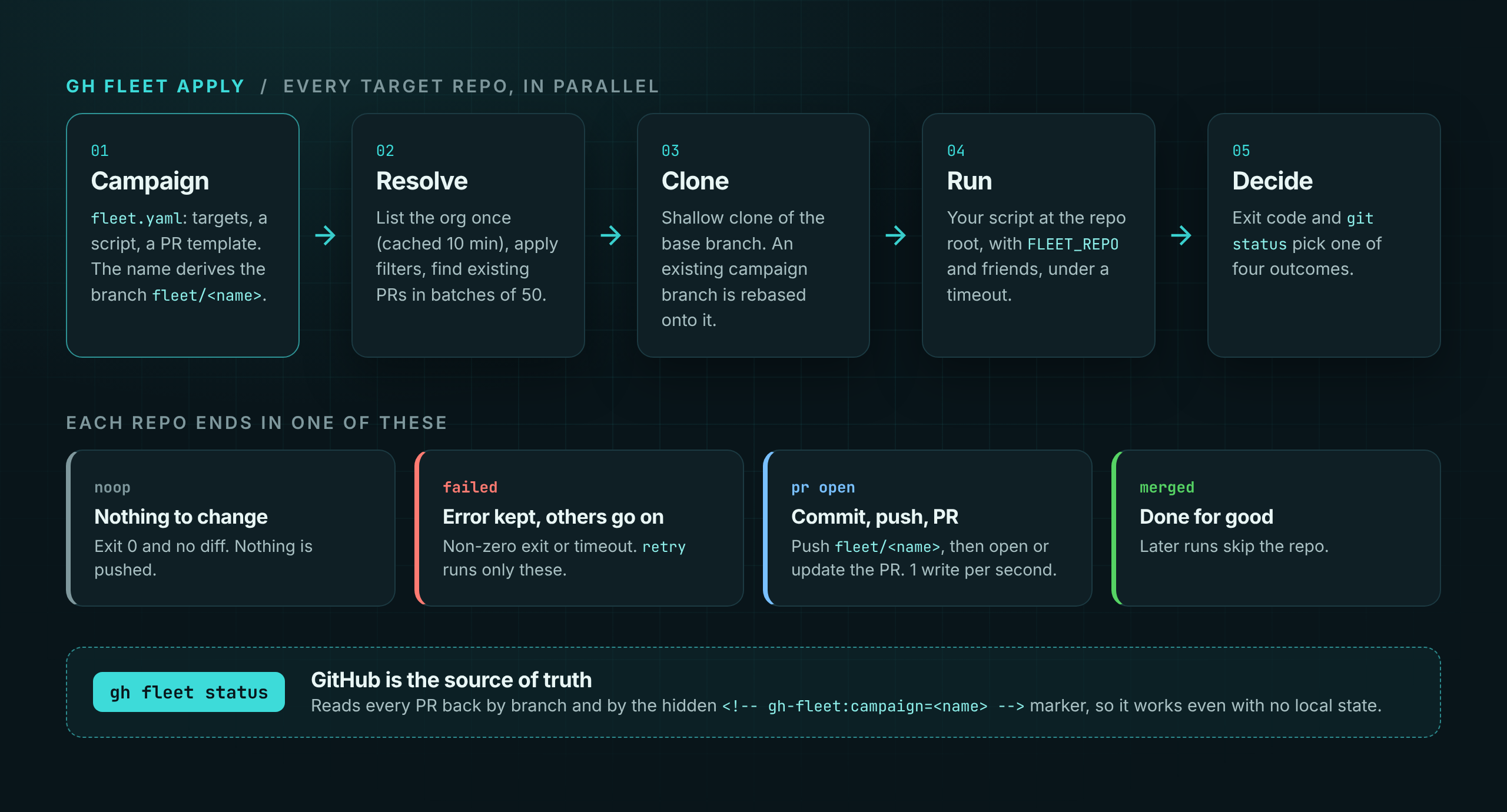
Every repo takes the same path.
Each can end differently.

A campaign file resolves to target repos. Each repo is cloned, the script runs, and the result is a noop, a failure, or a commit pushed to fleet/name with a pull request opened or updated. Status reads the pull requests back from GitHub.
Tap to open the full-size diagram

Make the change once.

Free and open source under the Apache 2.0 license.