Findings and remedies
A finding is one rule you keep correcting, backed by the signals that show it. This page covers how findings are formed and ranked, how each gets a remedy, and what happens when you accept one.
How findings are formed
Signals that state the same rule are clustered into one finding. Corrections and repeated instructions cluster on meaning (the classifier's rule, or the excerpt when offline); hook blocks, failure loops and fix-ups group on an exact key. How it works has the details.
A finding needs at least --min-count occurrences (3 by default) to be reported. Its score is
so a correction you make in four repos outranks a more frequent one confined to a single repo.
Findings keep their ID from run to run. New evidence for a rule you've already seen attaches to the same finding, along with its status and history.
Remedy routing
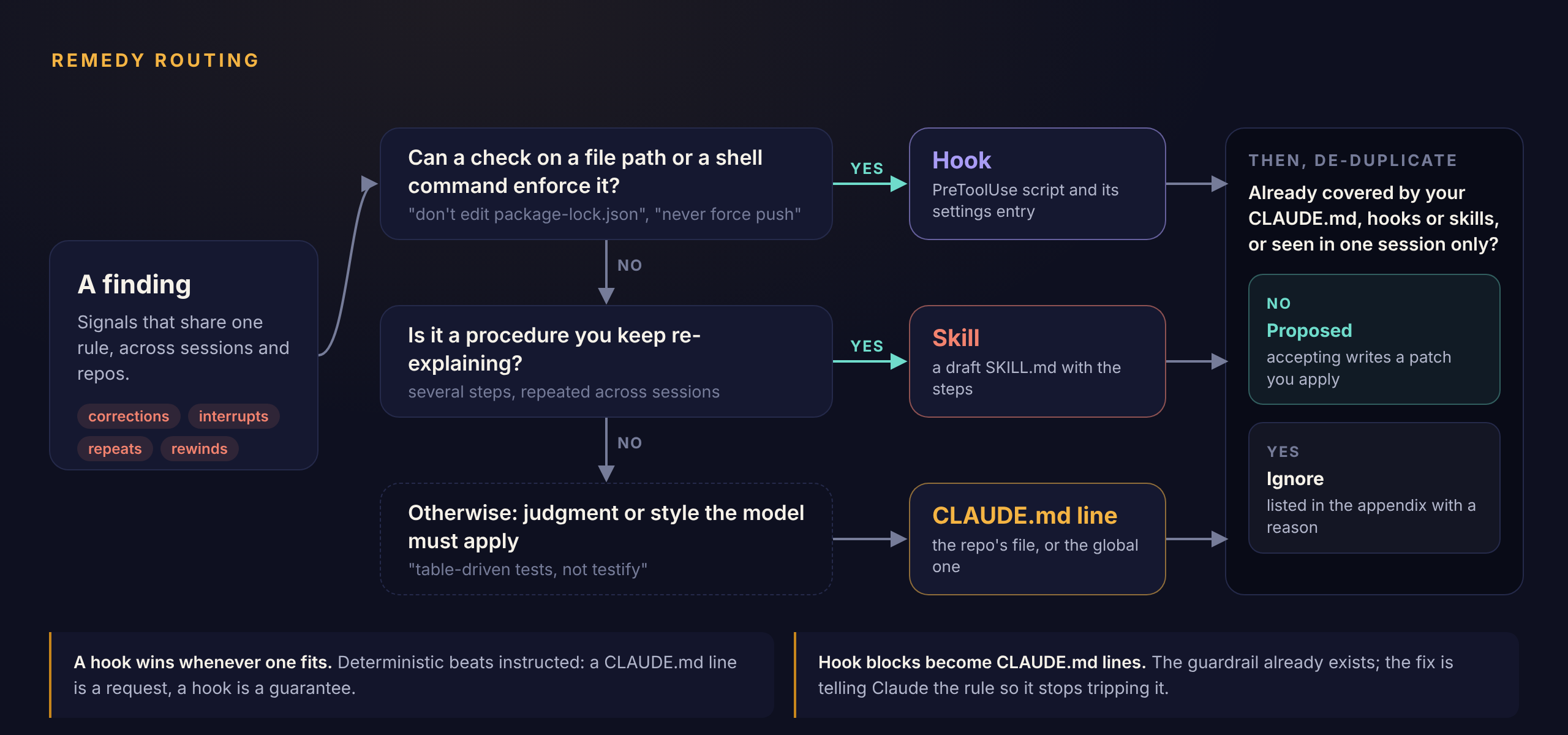
The rules, in order:
- Hook, when a mechanical check can be extracted: a negated edit of a named file ("don't edit package-lock.json", "never touch go.sum") or a negated command ("never run
git push --force"). When both a hook and a CLAUDE.md line would fit, the hook wins: a CLAUDE.md line is a request, a hook is a guarantee. - Skill, when the rule reads as a procedure (numbered or sequenced steps) or most of the evidence is repeated multi-step instructions.
- CLAUDE.md line otherwise: judgment and style the model has to apply.
With the classifier on, the model also drafts a title and proposal for each correction cluster, choosing among the same remedies with the same preference for hooks. Its hook patterns are validated before they're used.
Some families have fixed remedies:
- Hook blocks become a CLAUDE.md line telling Claude the rule the hook enforces.
- Failure loops become a CLAUDE.md line asking Claude to read the error before re-running, with a prompt to document the right invocation.
- Fix-ups become a CLAUDE.md line asking Claude to match conventions and run the formatter for that kind of file.
De-duplication
Before a proposal is reported, it's checked against what you already have. It's routed to Ignore, and listed in the report's appendix with the reason, when:
- every occurrence is in a single session (a one-off),
- an existing line in your global or repo CLAUDE.md says roughly the same thing,
- an existing hook (in
settings.jsonor your hooks directory) already mentions the same file or command, or - an installed skill has the same name or a similar description.
Instructions that aren't working
A rule that's already in CLAUDE.md isn't always covered. If you corrected Claude about it at least twice after the file holding it last changed, the instruction isn't working, and sminer escalates instead of ignoring it:
- When a mechanical check can be derived from the rule (it names a file or a command), the finding becomes a Hook. The report notes the line it's escalating from and how often it was ignored.
- Otherwise it's listed under Instructed but not followed in the report, with the line and the count. Rewording the line, moving it into the repo's CLAUDE.md, or writing a hook by hand are the options there.
The file's modification time stands in for when the line was added. Any later edit to the file resets the count, so the check errs on the side of not escalating.
The remedies
Hook
A PreToolUse script for your hooks directory, plus the settings.json entry to register it. The script reads the tool call's JSON on stdin, pulls out the file path or command (with jq, or python3 as a fallback), and exits 2 with a message when it matches. Claude Code then blocks the call and shows Claude the message.
if printf '%s' "$value" | grep -Eq -- '(^|/)package-lock\.json$'; then
  echo 'Blocked by sminer hook: Never hand-edit package-lock.json' >&2
  exit 2
fi
CLAUDE.md line
A unified diff appending the rule under a ## Learned conventions heading. The target is the repo's CLAUDE.md when every occurrence is in one repo, and your global ~/.claude/CLAUDE.md when the rule spans repos.
Skill
A draft SKILL.md in your skills directory, with the steps taken from the instructions you kept typing. Treat it as a starting point and edit it before you rely on it.
Accepting a finding
The quickest way through a batch is sminer review, a full-screen browser where p shows a finding's patch, a accepts it and d dismisses it (see the CLI reference). Everything it does is also a command:
sminer finding accept Fc72cc0 --preview   # print the patch, change nothing
sminer finding accept Fc72cc0             # write it, print its path
accept renders the patch against the target as it is right now, writes it atomically to $XDG_DATA_HOME/sminer/patches/<id>.patch, and prints the path on stdout. The apply command and any follow-up step, such as the settings.json entry for a hook, go to stderr. Nothing else on your machine changes.
Every patch starts with a header naming the finding and the command to apply it:
sminer Fc72cc0: Never hand-edit package-lock.json
Remedy: hook
Apply:  cd ~/src/claude-hooks && patch -p1 < THIS_FILE
patch and git apply both skip the header.
Several at once
Pass several IDs to accept them together. CLAUDE.md lines for the same file go into one patch, named after their IDs, that adds them all under ## Learned conventions:
sminer Fc72cc0, F81d2e4: 2 CLAUDE.md lines
  Fc72cc0 Write table-driven tests with the standard library, not testify
  F81d2e4 Run `go test ./...` before saying a change is done
Remedy: claude_md
Apply:  cd ~/src/api && patch -p1 < THIS_FILE
Every patch is built before any is written, so a finding that can't be patched (say, a hook whose script already exists) stops the whole batch with nothing changed.
Apply before accepting more for the same file
Patches are rendered against the file as it is when you accept. Accept a file's lines together, or apply one patch before accepting another finding for the same CLAUDE.md, or the second patch won't apply cleanly.
A finding's life
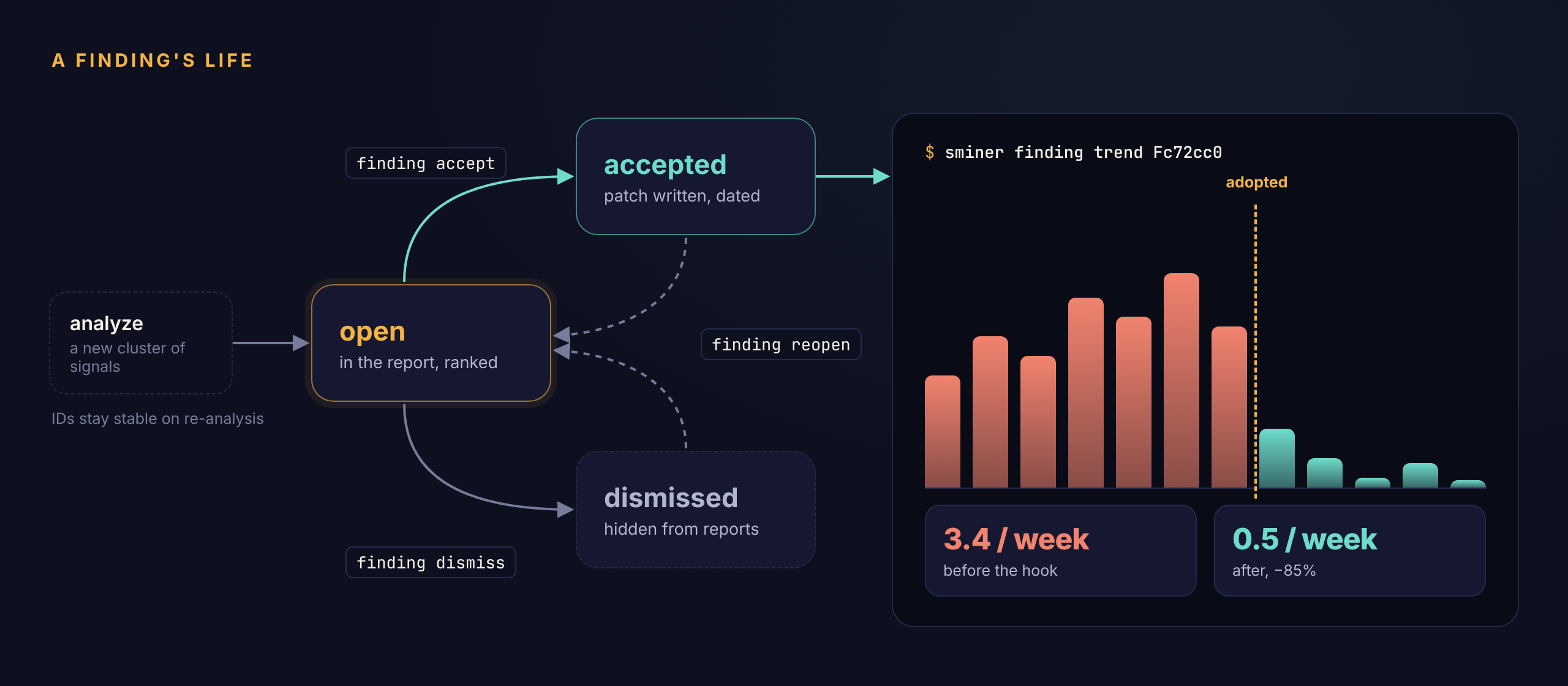
| Status | Meaning | How to get there |
|---|---|---|
open |
In the report, ranked | New findings; finding reopen |
accepted |
Patch written; adoption date recorded | finding accept |
dismissed |
Hidden from reports and from finding list |
finding dismiss --reason … |
Re-analysis never changes a finding's status. New evidence keeps attaching to it, which is what makes the trend meaningful.
Trends
For an accepted finding, the weekly rate is split at the adoption date:
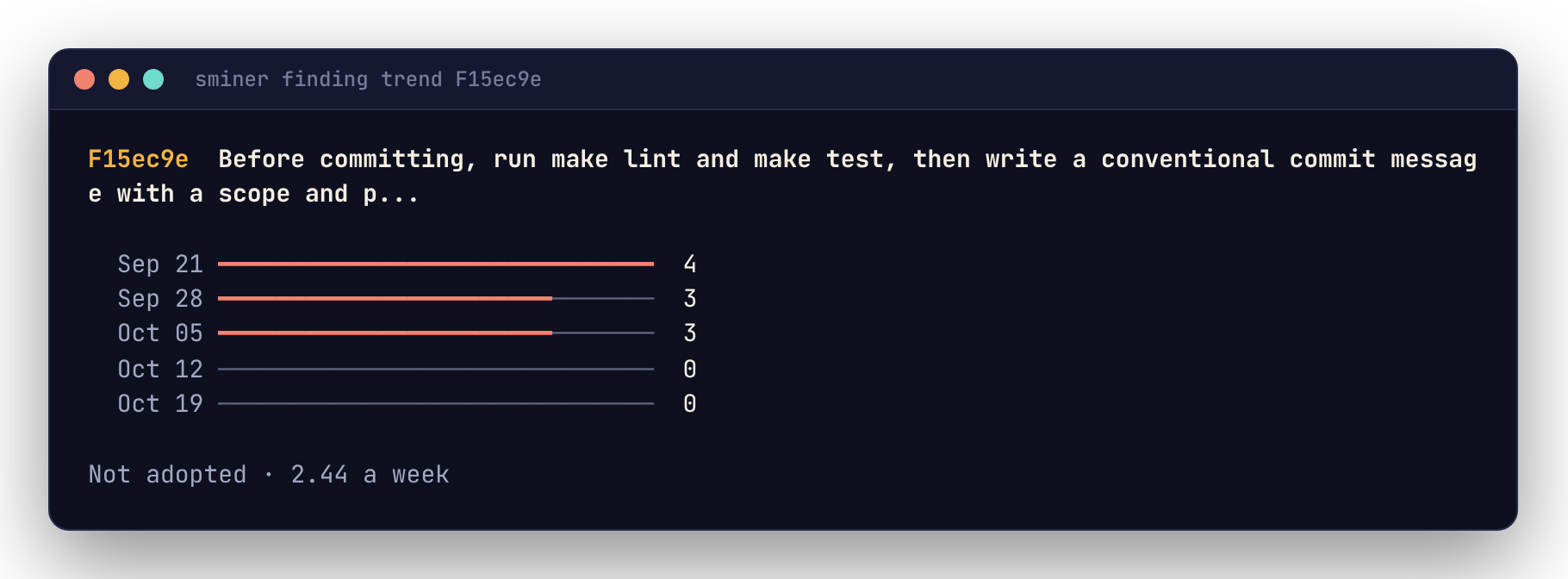
Piped, the same view is plain text:
If the rate after adoption doesn't fall, the fix isn't working: a CLAUDE.md line Claude ignores is a good candidate for a hook.