Install and first run
Install the binary, scan one repo on disk, read the report, and write a metrics file. It takes about two minutes and needs no GitHub token, no cloud credentials and no terraform binary.
Install
Works on macOS and Linux. brew upgrade tfmetrics picks up new releases.
Needs the Go version in go.mod. The binary lands in $(go env GOPATH)/bin.
Pick the archive for your platform from the releases page. Linux, macOS and Windows builds exist for amd64 and arm64.
VERSION=0.1.0        # the release without its leading v
OS=linux ARCH=amd64  # linux|darwin|windows and amd64|arm64
BASE=https://github.com/rossedman/tfmetrics/releases/download/v${VERSION}

curl -fsSLO ${BASE}/tfmetrics_${VERSION}_${OS}_${ARCH}.tar.gz
curl -fsSLO ${BASE}/checksums.txt
curl -fsSLO ${BASE}/checksums.txt.sigstore.json
Verify the download before you run it (below), then unpack:
Verify a release
Every release is built by GitHub Actions. checksums.txt covers every archive and is signed keylessly with cosign through the workflow's GitHub identity, so there is no key to trust or rotate.
cosign verify-blob checksums.txt \
  --bundle checksums.txt.sigstore.json \
  --certificate-identity-regexp '^https://github.com/rossedman/tfmetrics/.github/workflows/release.yml@refs/tags/v' \
  --certificate-oidc-issuer https://token.actions.githubusercontent.com
sha256sum --ignore-missing -c checksums.txt
gh attestation verify tfmetrics_${VERSION}_${OS}_${ARCH}.tar.gz --repo rossedman/tfmetrics
A signature from any other repository or workflow fails the identity check. On macOS use shasum -a 256 --ignore-missing -c checksums.txt.
Scan a repo
Point scan at any directory that holds Terraform. It writes one facts file per repo, and names the repo from the checkout's origin remote (or local/<dir> without one).
Nothing was fetched and nothing was executed. scan also takes a git URL or a GitHub owner/name, which it shallow-clones with a sparse checkout of the Terraform files.
Read the report
explain turns a facts file into a report: inventory, the hygiene score with the checks behind it, every remote module call and how it is pinned, and parse diagnostics. --offline keeps it from looking anything up, so this example needs no network:
$ tfmetrics explain facts/acme__infra.json --offline
acme/infra @ 1c35bc0af618
owners: acme/platform

modules      5 (2 root, 3 child)
resources    8 declared, 1 data sources
module calls 8 (1 remote unpinned)
lines        194
parse errors 1

hygiene score 65.3 / 100
  Remote module calls pinned           5/6  weight 30
  Variables and outputs described      4/8  weight 15
  Providers with a version constraint  2/5  weight 15
  Roots with required_version          1/2  weight 15
  Variables with a type                3/4  weight 15
  Modules that parse cleanly           4/5  weight 10

modules
  PATH            KIND   RESOURCES  CALLS  BACKEND  REQUIRED_VERSION
  broken          child  1          0      -        -
  live/prod       root   3          6      s3       >= 1.6.0
  live/staging    root   1          2      cloud    -
  modules/legacy  child  1          0      -        -
  modules/vpc     child  2          0      -        >= 1.5

remote module calls
  ADDRESS                                                    KIND              VERSION  PINNED  IN
  app.terraform.io/acme/sqs/aws                              private_registry  2.1.0    exact   live/prod
  github.com/acme/tf-dns                                     git               v1.4.0   exact   live/prod
  github.com/acme/tf-iam                                     git               -        none    live/prod
  registry.terraform.io/terraform-aws-modules/eks/aws        registry          19.21.0  exact   live/prod
  registry.terraform.io/terraform-aws-modules/eks/aws        registry          17.24.0  exact   live/staging
  registry.terraform.io/terraform-aws-modules/s3-bucket/aws  registry          ~> 3.15  range   live/prod

diagnostics
  error broken/main.tf:1: Unclosed configuration block
The broken file did not stop the scan. It became a diagnostic, a parse errors count and a lower parse_clean score.
How far behind each module is
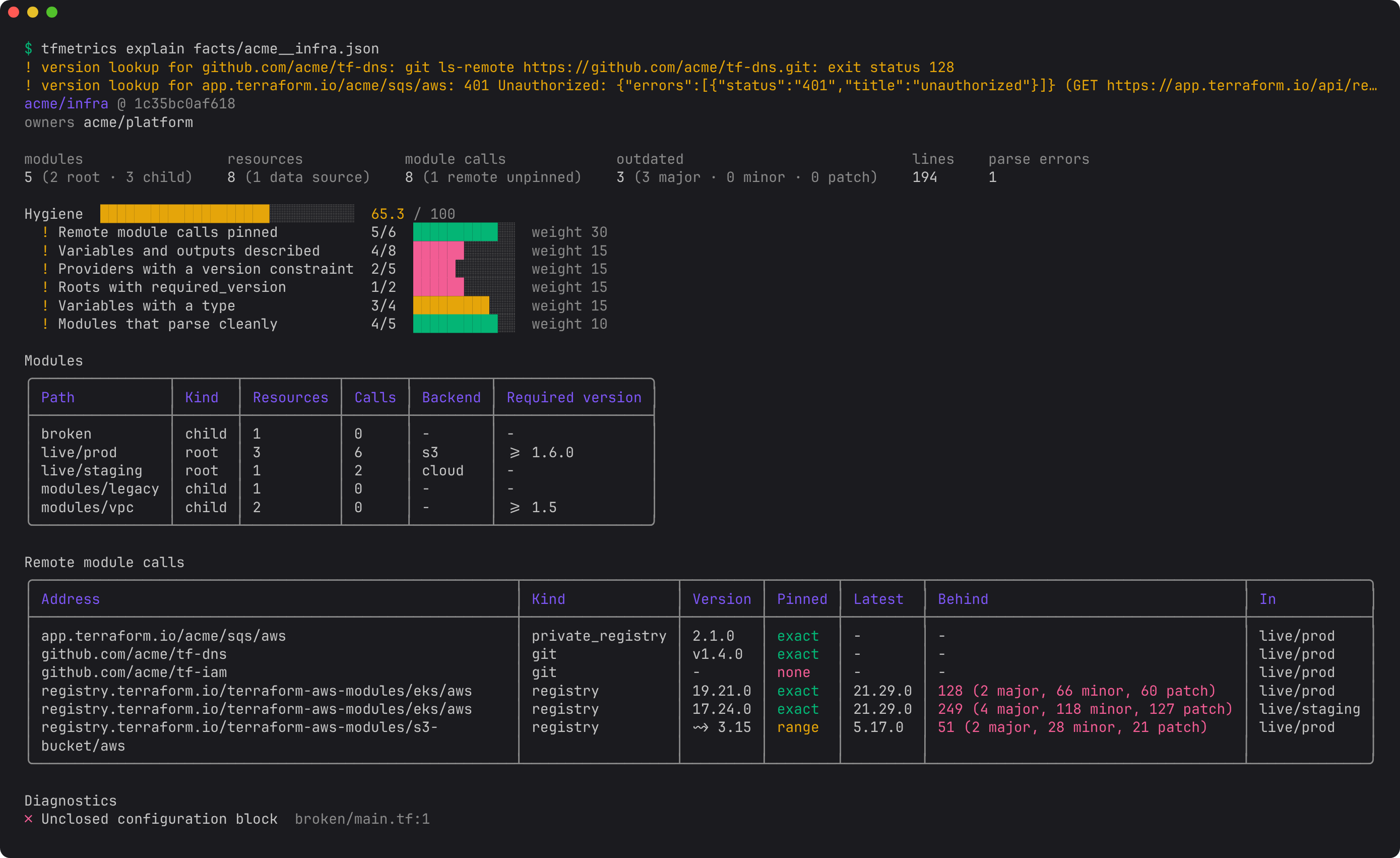
Without --offline, explain looks up the releases of every pinned module call, from the registry or the git repo's tags, and adds two columns. LATEST is the newest release. BEHIND counts the releases newer than the version the call uses, split by kind: a release is major, minor or patch by what it changes from the release before it. An outdated line sums up how many calls are missing a major, minor or patch release. These versions were looked up on 2026-10-22, so yours will differ:
$ tfmetrics explain facts/acme__infra.json
...
module calls 8 (1 remote unpinned)
outdated     3 (3 major, 0 minor, 0 patch)
...
remote module calls
  ADDRESS                                                    KIND              VERSION  PINNED  LATEST   BEHIND                               IN
  app.terraform.io/acme/sqs/aws                              private_registry  2.1.0    exact   -        -                                    live/prod
  github.com/acme/tf-dns                                     git               v1.4.0   exact   -        -                                    live/prod
  github.com/acme/tf-iam                                     git               -        none    -        -                                    live/prod
  registry.terraform.io/terraform-aws-modules/eks/aws        registry          19.21.0  exact   21.29.0  128 (2 major, 66 minor, 60 patch)    live/prod
  registry.terraform.io/terraform-aws-modules/eks/aws        registry          17.24.0  exact   21.29.0  249 (4 major, 118 minor, 127 patch)  live/staging
  registry.terraform.io/terraform-aws-modules/s3-bucket/aws  registry          ~> 3.15  range   5.17.0   51 (2 major, 28 minor, 21 patch)     live/prod
A range constraint is measured from the version terraform init would pick: ~> 3.15 picks the newest 3.x. The major and minor counts added together are the call's tf_module_versions_behind, so the report and the metric always agree. A - means there is nothing to measure (the call is unpinned or pinned to a commit) or the lookup failed: here acme/tf-dns and the private registry do not exist, and explain warns about each on stderr.
On a terminal the report is styled, and BEHIND is red for calls missing a major release, yellow for a minor one and green when up to date:
Write metrics
aggregate reads facts files, computes the metrics catalog and writes it to one or more sinks. --offline skips the registry and git tag lookups that tf_module_versions_behind needs.
$ tfmetrics aggregate facts/ --offline --sink openmetrics
aggregated 1 repos (1 with Terraform) into 36 series
$ grep hygiene metrics/metrics.prom | tail -1
tf_hygiene_score{org="acme",owner="acme/platform",repo="acme/infra"} 65.3
Drop --offline to look up the available versions of each module, provider and Terraform itself, and add tf_module_versions_behind, tf_provider_versions_behind and tf_terraform_versions_behind. Lookups that fail (a private registry without a token, an unreachable git remote) print a warning and leave that series out; they never fail the run.
Next steps
- Learn by goal, with real commands and output: Tutorials cover an org audit, upgrade campaigns, provider and Terraform drift, pull request guardrails, and large orgs.
- Scan a whole org: set
source.github.orgsin the config (every key) and runtfmetrics org, or follow Nightly org scan. - Gate pull requests on one repo: PR check.
- Understand the stages: How it works.