+Added
The path didn't exist in any lower layer.
Explain container images, layer by layer.
Find the waste. Gate it in CI.
go install github.com/rossedman/muscles/cmd/muscles@latest
The problem
docker history gives you commands and sizes. What each layer actually put on disk, and what it left behind, takes an export, a pile of tarballs and an afternoon.
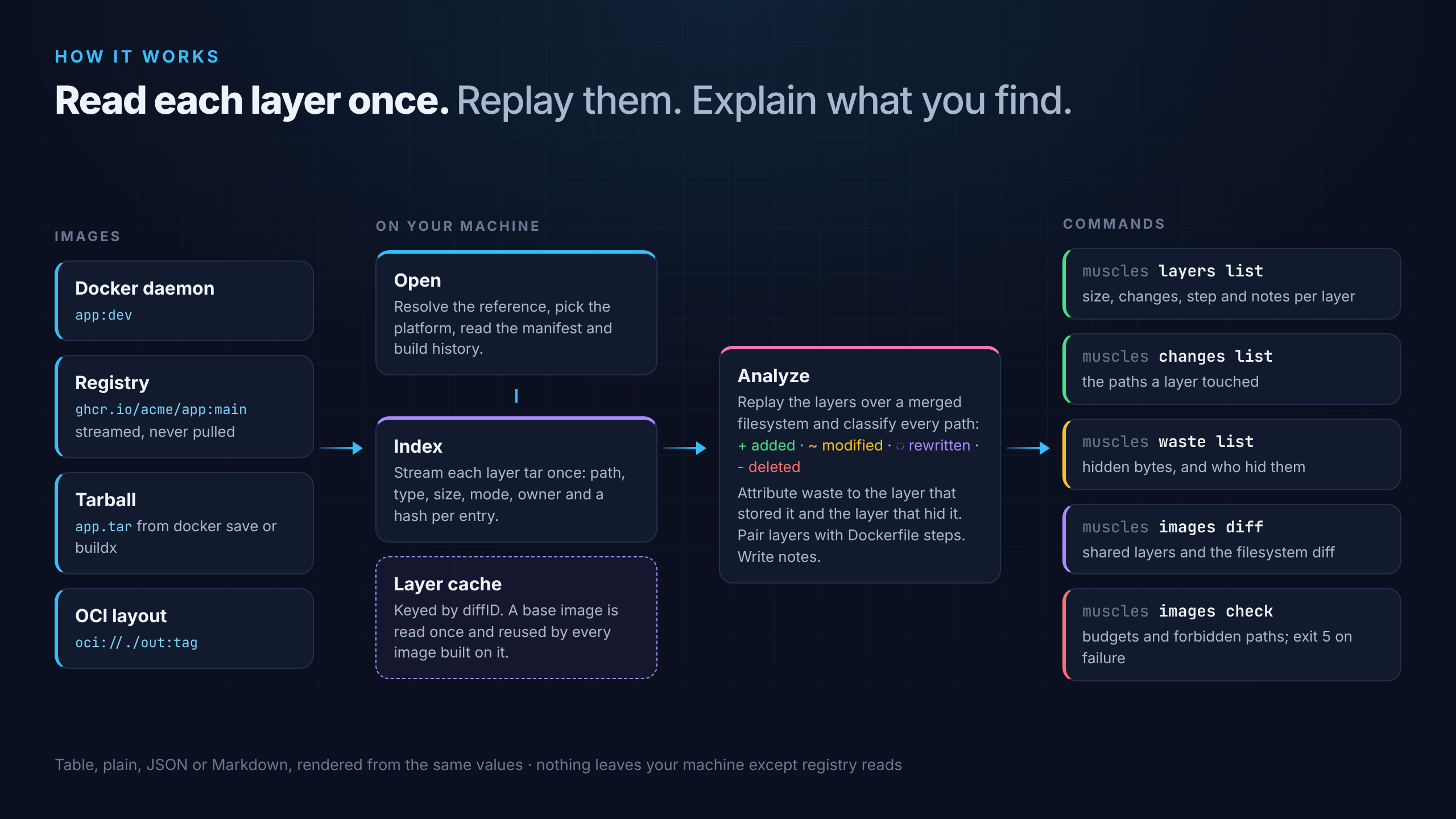
muscles replays the layers over a merged filesystem and tells you, per layer, what changed, where the bytes went, and what's worth fixing.
Four kinds of change
Each entry in a layer is compared with the filesystem below it. Waste is every byte a layer stores that a later layer hides, with both layers named.
The path didn't exist in any lower layer.
The path existed below with different contents. The old copy is still stored: waste.
The same contents stored again, only permissions or owner changed. The classic chown -R tax.
A whiteout hid the path. The bytes are still in the layer that stored them.
In CI
Commit a .muscles.yaml next to your Dockerfile. muscles images check exits 5 when the image is too big, wastes too much, grew too fast against the main branch, or ships a path you forbid, like **/.env.
# .muscles.yaml
check:
  max_size: 800MB
  max_waste: 50MB
  max_growth: 5%
  forbid: ["**/.env", "**/.git/"]
$ muscles images check app.tar --baseline ghcr.io/acme/app:main
✓ pass  size       401 MB ≤ 800 MB
✗ fail  waste      108 MB > 50 MB  /app/: chown -R in L4
✓ pass  growth     +38 MB ≤ +40 MB vs ghcr.io/acme/app:main
✗ fail  forbid     /app/.env matches "**/.env"  added in L5 COPY . .
⚠ warn  package cache  apt lists left behind: 12 MB

2 failed, 1 warning                        exit 5
Why muscles
Layers stream straight from the registry and are read once. Auth comes from your Docker config and credential helpers, never from flags.
Layer indexes are keyed by content digest. A base image is read once and every image built on it opens instantly.
muscles images diff shows the layers two images share, the size of each one that differs, and every path that changed.
Noun-verb commands, typed streams, documented exit codes, --json everywhere, real examples in every help page, and help --json for agents.
No telemetry. The only network calls are reads from the registries you name.
No cgo, no runtime, no Docker. Released for macOS, Linux and Windows with completions and a man page.
Quick start
Point muscles at anything that holds an image: a local tag, a registry reference, a tarball or an OCI directory. No config file needed.
Full getting-started guide$ brew install rossedman/tap/muscles$ muscles python:3.12-slim
$ muscles layers list python:3.12-slim$ muscles changes list python:3.12-slim --layer 2
$ muscles waste list python:3.12-slimHow it works
Commands
Every command has examples in its help, --json for scripts, and errors that say what to run next.
Documentation